Best Practices • 6 min read • Updated September 11, 2026
Why Is My Instagram Messages Purple? Everything Behind the Purple Bubble

Scrolling into a chat and seeing every bubble suddenly glowing violet can be a little jarring the first time it happens. The short answer to why is my Instagram messages purple is refreshingly simple: it’s a theme, not a warning sign. This guide walks through what that purple bubble actually means, why it shows up out of nowhere sometimes, and how to change it if it’s not your style.
What a Purple Bubble Actually Means
A purple bubble is just one of several built-in looks Instagram offers for direct chats. Instead of the plain grey-and-blue look the app used for years, conversations can now carry a personal chat theme — a background and bubble shade pair that either person in the thread can pick. Violet happens to be one of the more popular options, often appearing as part of a gradient that blends into blue or pink depending on the exact pick chosen.
Nothing about a purple message changes how the conversation works. It doesn’t affect delivery, read receipts, or who can see the thread — it’s a cosmetic layer sitting on top of an otherwise ordinary chat.
The App’s Theme Feature, Explained
Messaging picked up a lot of its current look after direct messages on the app were rebuilt on shared infrastructure with Messenger. That update brought a proper chat theme system: instead of one fixed look for every conversation, each thread can carry its own background, gradient, or solid tone. A single message sent in one theme can look completely different from the same words sent in another chat.
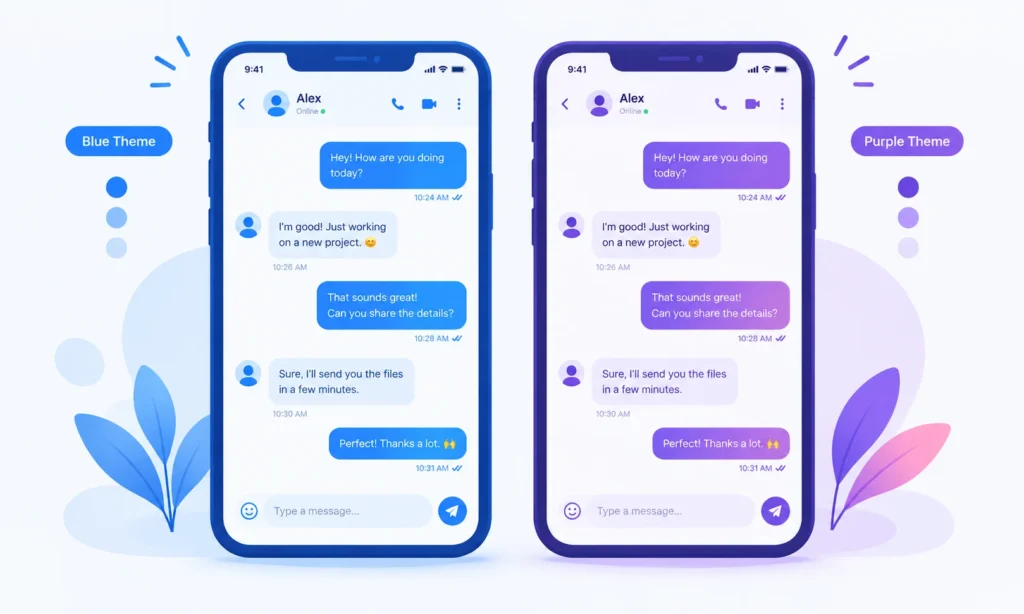
This is really the whole Instagram messaging experience in a nutshell now — themes are meant to make each conversation feel a little more personal, whether that means a bright gradient for a close friend or something plainer for a work contact.
Why Did It Show Up Suddenly?
A handful of everyday reasons explain most cases:
- Instagram application updates occasionally introduce new default themes or seasonal picks, and a violet gradient has shown up as a featured option during past rollouts.
- The other person changed it. A chat theme applies to the whole thread, not just one side. If the other person picked violet, it now shows on both phones.
- It was chosen by accident. The theme menu sits close to other settings in the chat info screen, so a stray tap while browsing the app can switch it without much notice.
- A newer Instagram version rolled the feature out. If the update Instagram prompt was ignored for a while, the switch to themed bubbles can look sudden once it finally installs. Instagram didn’t always have this feature, so accounts that skipped a few versions can see the change all at once.
If Instagram settings simply didn’t have themes turned on before, this can feel like the whole interface changed overnight, even though it’s just one feature catching up to the current release.
Purple Bubble vs Blue Messages vs Other Looks

The classic setup used plain blue messages for anything sent and grey for anything received — the same look people may remember from years ago. Custom themes replaced that single default with a whole menu of options. The theme purple sits alongside blues, pinks, greens, and neutral tones, and there’s nothing that ranks it above or below the rest; it’s simply one of many different colors available in the picker. The bubble tone itself carries no hidden meaning beyond personal taste.
A Quick Aside: No Relation to “The Color Purple”
It’s a fun coincidence of naming, but this violet gradient has nothing to do with The Color Purple, the stage musical based on Alice Walker’s novel. Any overlap begins and ends with the shade itself.
How to Change It Back (or Pick a New Theme)
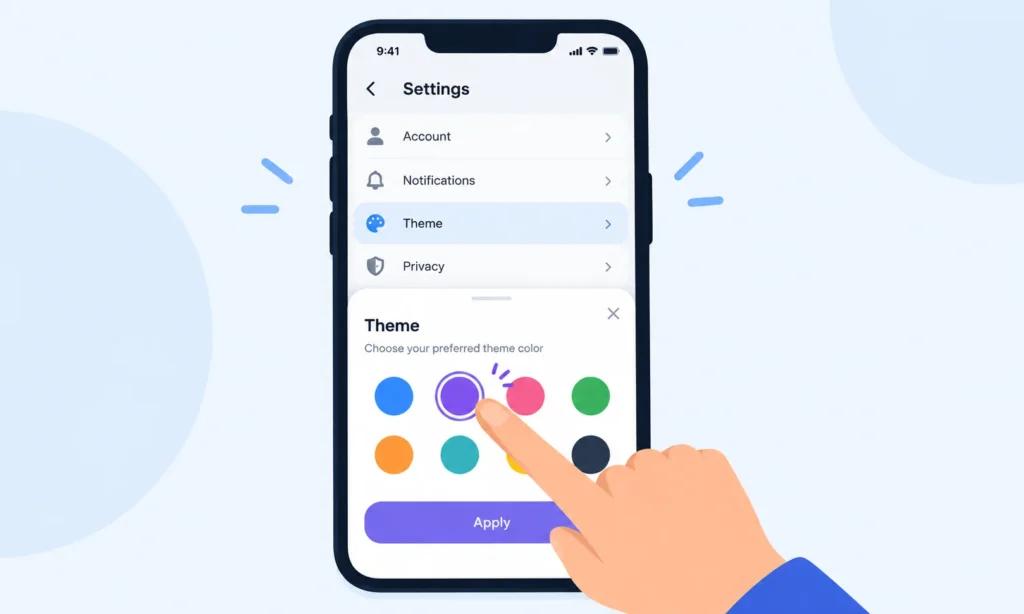
Switching away from the bubble Instagram currently shows is a short process:
- Open the conversation and tap the contact’s name at the top.
- Look for the theme option inside the chat settings menu.
- Choose a different personal chat theme, or the classic default option.
- The new look applies immediately for both people in the thread — no separate step needed on the other end.
For anyone managing several active threads, it can help to open the Instagram DMs list first and decide which ones actually need a distinct look, rather than changing every one at once. This also comes in handy for older threads full of exchanged messages, since the pick applies retroactively to the whole history, not just new messages going forward.
Does the Purple Bubble Mean Anything Else?
It’s worth being direct about what a violet thread does not signal. It isn’t tied to being blocked, muted, or restricted, and it isn’t a marker for message requests sitting in a separate inbox. Instagram users occasionally connect the shade to privacy features like Vanishing Mode, but that mode has its own distinct look and a clear on-screen label when it’s active — it isn’t simply a set of purple bubbles left unexplained. Whatever Instagram managers decide to call the next seasonal theme, the underlying mechanic stays the same: it’s a look, not a status.
Quick Recap
At the end of the day, that purple bubble shown by default in some chats is exactly what it looks like — a chat theme, nothing more. It’s simply Messages’ way of letting a conversation feel a little more personal than plain grey and blue ever did. If it’s not to your taste, the theme menu is a few taps away and switches things back instantly for both sides of the chat.
For anyone curious about other quirks in how the app behaves behind the scenes, this breakdown of why certain accounts get suggested to you is a good next read, and anyone building content on the app might also enjoy this guide to Reels slow motion.
Sources
- Android Police — Instagram: How to Change Your Chat Theme
- How-To Geek — How to Change the Theme and Accent Color of a Chat
- MakeUseOf — Guide to Message Customization
- ScreenRant — How To Change The Background Of Your DM