What is Instagram Song Download and How Does It Work?
Instagram has become one of the premier platforms for discovering trending music, independent artist snippets, background beats, and viral audio memes. However, the official Instagram application does not provide a native "Export to MP3" button to save audio files directly to your device's local storage.
Insta Song Download is an all-in-one, browser-based utility that extracts high-fidelity audio streams (up to 320 kbps MP3) directly from Instagram Reels, Stories, IGTV, and regular video posts. Our service connects to official public media endpoints, strips the video stream if audio-only is requested, and packages the sound file into standard MPEG-3 format compatible with all media players, ringtone creators, and editing software.
Step-by-Step Instructions: iOS, Android, and Desktop
📱 On iPhone / iPad (iOS Safari)
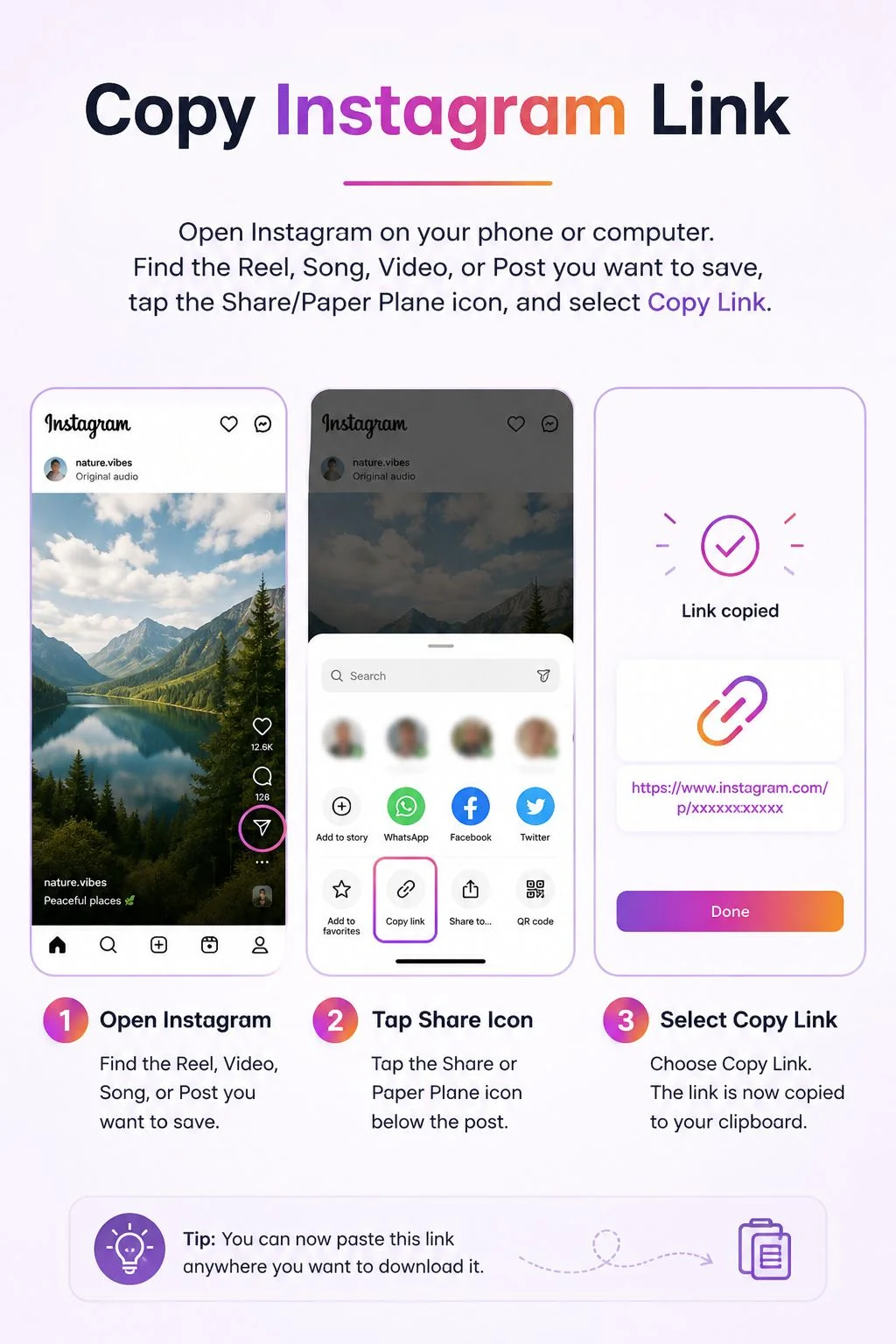
- Launch the Instagram app on your iPhone and locate the desired Reel or Story.
- Tap the Share icon (the paper plane on the right) and tap Copy Link.
- Open Safari and navigate to
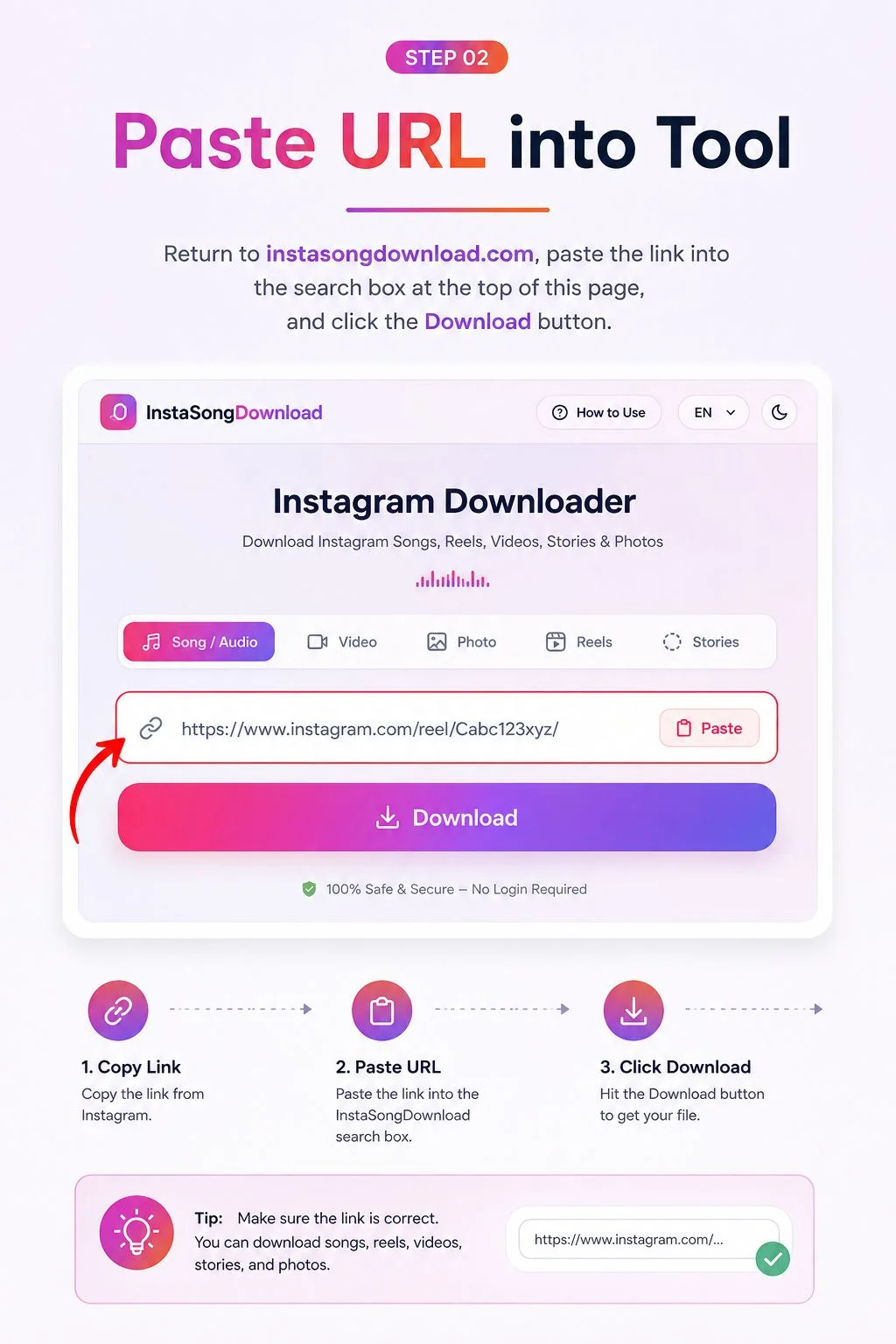
instasongdownload.com. - Paste the link into the URL input box and tap Download.
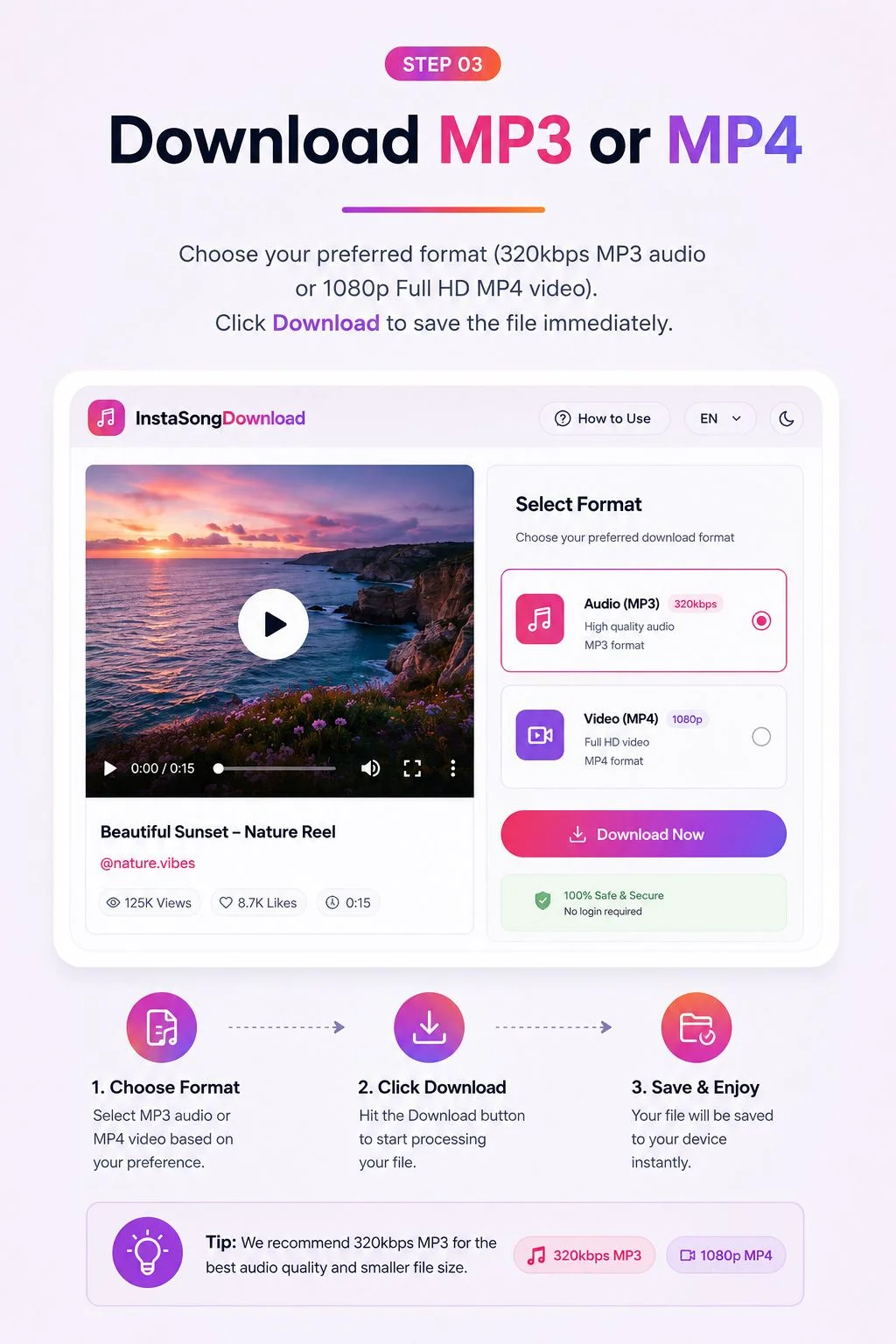
- When the file card appears, tap Download MP3. Safari will display a download prompt; tap Download to save the file into your Safari Files > Downloads folder.
🤖 On Android Devices (Samsung, Pixel, Xiaomi, etc.)
- Open Instagram, find the video or audio clip, and tap the three dots (⋮) or the Share button.
- Select Copy Link to copy the public Instagram URL to your clipboard.
- Open Google Chrome or your default mobile browser and visit
instasongdownload.com. - Tap the Paste button and press Download.
- Tap Download MP3 or Download MP4. The file will be saved directly into your device's Downloads folder and will immediately show up in your Music Player or Gallery.
💻 On PC, Mac & Chromebook
- Open your web browser (Chrome, Edge, Firefox, Safari) and visit Instagram.com.
- Navigate to the Reel, Post, or Video you wish to save. Copy the full URL from your browser's address bar.
- Go to
instasongdownload.com, paste the link in the input box, and click Download. - Preview the audio or video, then click Download MP3 (320kbps) to save it directly to your computer.
Supported Content Types, Formats & Specifications
Our tool supports all major media types available on the Instagram ecosystem. The table below details supported formats, maximum resolutions, and expected audio bitrates:
| Content Type | Input Source | Output Format | Max Resolution / Bitrate | Watermark |
|---|---|---|---|---|
| Song / Audio | Reels, Posts, Audio URLs | MP3 | Up to 320 kbps (Stereo, 44.1kHz) | No Watermark |
| Instagram Reels | Reels tab links | MP4 | 1080p Full HD (60 fps) | No Watermark |
| Feed Videos | Standard Post videos | MP4 | 1080p (Original bitrate) | No Watermark |
| Photos & Carousels | Single / Multi-photo posts | JPG / PNG | Full Native Resolution (1080x1350) | Original Quality |
| Stories & Highlights | 24h Stories, Story Highlights | MP4 / JPG | 1080x1920 (Vertical 9:16) | No Watermark |
| DP / Profile Picture | Username / Profile link | HD JPG | Original High-Res Avatar | Clean HD Zoom |
Troubleshooting Common Instagram Download Issues
If you encounter an error while attempting to extract media, refer to the common troubleshooting solutions below:
- Private Account Restriction: If the post is hosted on a private Instagram account, third-party downloaders cannot access the media streams due to Meta's privacy policy. The post must be publicly accessible.
- Audio Track Muted by Regional Copyright: In certain regions, specific licensed songs may be muted or restricted by Instagram. If the audio is silenced in the original video, the extracted MP3 file will also contain silence.
- Expired Stories: Instagram Stories naturally expire 24 hours after publication. Ensure the story is still active or saved in the user's permanent Story Highlights before copying the link.
- Malformed URL: Ensure the link copied contains the full Instagram URL format (e.g.,
https://www.instagram.com/reel/C8...orhttps://www.instagram.com/reels/audio/...).
Legal Disclaimer & Fair Use Notice
instasongdownload.com operates in strict compliance with digital fair-use standards and international copyright regulations. We do not store, host, or index copyrighted audio recordings or videos on our servers. All extraction and decoding processes occur transiently in real time.
Users are solely responsible for respecting the intellectual property rights of content creators. Downloading media for personal offline listening, academic research, criticism, or parody is generally recognized under fair use doctrines. Downloading copyrighted music or videos for unauthorized commercial reproduction, redistribution, or broadcast is strictly prohibited.